Multisig Configurations
Document the multi-signature wallets you use, the devices that sign them, and recovery instructions (including which coordinator software to use).
Why Document a Multisig Wallet?
A multi-signature wallet spreads control across several signing devices — for example, a 2-of-3 setup needs any two of three keys to authorize a spend. The redundancy is fantastic for security, but it makes recovery much harder than a single seed phrase. Anyone restoring your multisig needs the right number of devices plus the wallet's descriptor or coordinator file, plus a clear idea of how the original setup was assembled.
Legacy Key gives you one place to record all of that, so your future self — or your inheritance contacts — can rebuild the wallet without guesswork.
Plan availability: Multisig is available on the Recovery and Legacy plans. Recovery supports up to 3 configurations and Legacy supports up to 5. Both plans allow up to 5 signing devices per configuration.
Step 1: Add Each Signing Device as a Wallet
In Legacy Key, every signing device in a multisig is represented as a regular wallet entry. Before creating a multisig configuration, add each device through the normal Adding Wallets flow. For each one, record:
- Brand and model (e.g., "Coldcard Mk4", "Trezor Safe 3")
- Serial number
- Firmware version at setup
- Where the device physically lives
- Where the corresponding seed backup is stored (linked via Backup Locations)
Treat each device as a first-class wallet — it has its own seed, its own backup, and its own verification cadence. The multisig configuration ties them together.
Step 2: Create the Multisig Configuration
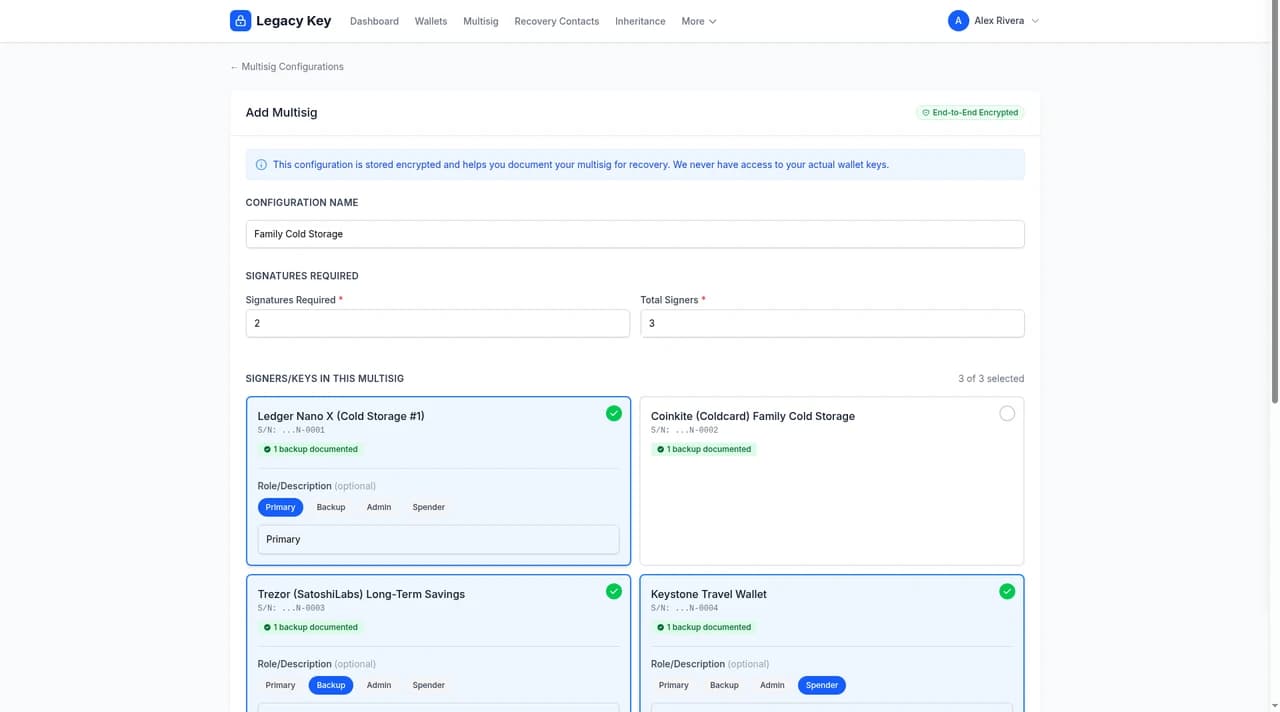
From the dashboard, open Multisig and click New Configuration. The form captures everything someone would need to reconstruct the wallet.
Identity
- Configuration Name: a clear label like "Family Vault", "Business Treasury", or "Cold Storage 2-of-3"
- Signatures Required and Total Signers: the M-of-N, for instance 2 required out of 3. A configuration can have 2 to 5 signing devices.
Coordinator Software
Name the coordinator software you used (for example Sparrow, Specter Desktop, Casa, Electrum, Nunchuk, or BlueWallet) in Configuration & Recovery Instructions, ideally as the first step. It's the first thing a recoverer needs. Without the right coordinator, the descriptor file may not even open.
Participating Devices
Link the wallets you added in step 1 to this configuration. For each one you can add an optional role — useful free-text labels like:
- Primary Signer — the device you use day-to-day
- Backup — co-located secondary signer
- Geographic Backup — a key kept somewhere else physically
- Inheritance Key — a key held by a trusted contact or in escrow
Roles are documentation only — Legacy Key doesn't enforce them. Pick whatever vocabulary your future contacts will understand.
Recovery Instructions
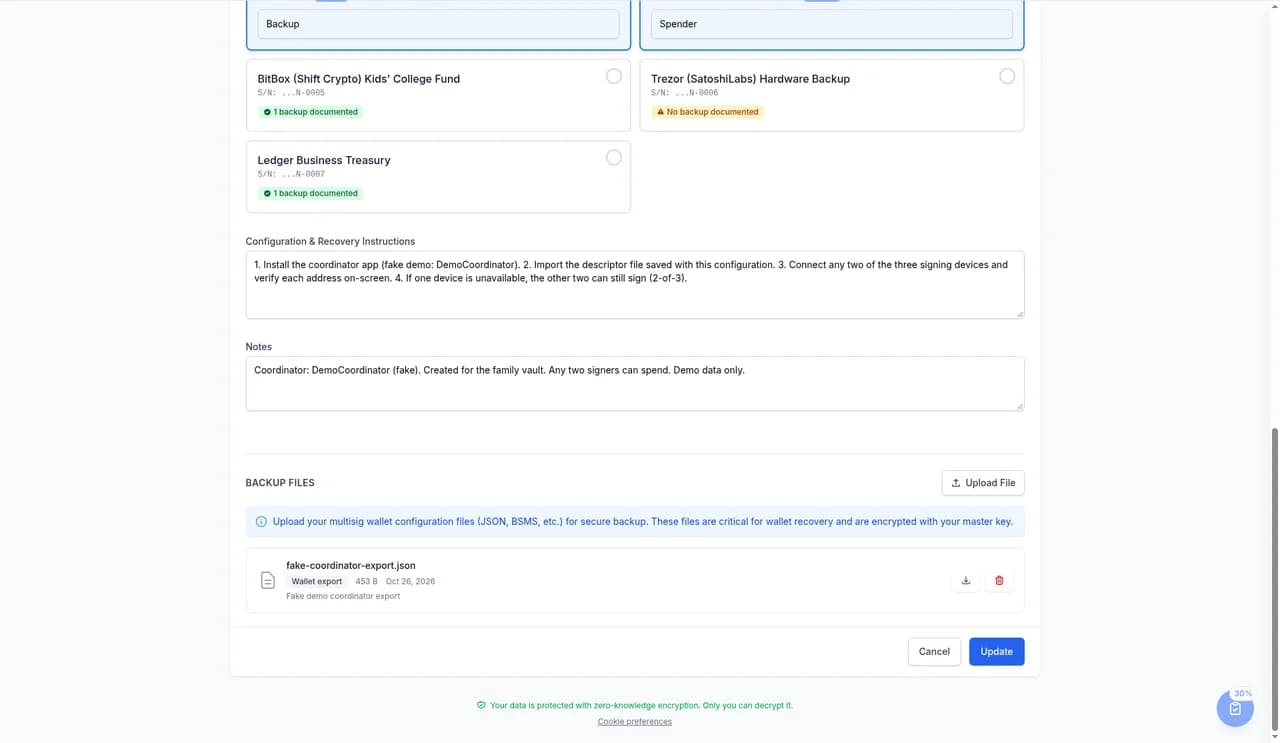
Write step-by-step instructions for rebuilding the wallet. Pretend you're leaving them for someone who's technical enough to use a hardware wallet but doesn't know this setup. Cover:
- Which coordinator software to install, and where to download it
- How to import the descriptor or configuration file
- The order in which devices should be connected and verified
- What to do if one signer is unavailable (per your M-of-N tolerance)
- Any quirks specific to your setup (passphrases, custom derivation paths, etc.)
Notes
Any extra context — why this wallet exists, what it holds, any agreements between co-signers, key rotation history. Notes are encrypted at rest like the rest of your data.
Step 3: Upload Configuration Files
Most coordinator software exports a small file that captures the wallet descriptor — the xpubs, derivation paths, and signing policy. This file is what actually lets someone re-import your multisig. Upload it under the configuration so it's preserved alongside the instructions.
File Format and Limits
- Accepted formats:
.json(Sparrow, Specter, Casa exports),.txt(Coldcard text descriptors and similar),.bsms(BSMS multisig setup files),.psbt(partially signed transactions, for audit trail) - Maximum size: 1 MB per file
- You can upload multiple files per configuration — for example, both the original descriptor and a backup export from a different coordinator
- All content is encrypted in your browser before upload. Filenames and descriptions are encrypted alongside the file body so the server only sees opaque ciphertext.
What to upload: the descriptor / wallet-config export, never the seed phrases themselves. Coordinator exports contain public keys (xpubs) and the multisig policy — they're safe to store. Seed phrases stay on your hardware wallets and in your offline backups, full stop.
How Multisig Surfaces in the Emergency Access Document
If you have at least one multisig configuration, your Emergency Access Document automatically grows a dedicated Multisig Configurations section. For each configuration it shows:
- The configuration name and quorum (e.g., "Family Vault — 2 of 3")
- Your recovery instructions, including the coordinator software
- Each participating wallet (brand, model, serial, role) so the recoverer knows which devices to gather
- The recovery instructions you wrote, preserved with their original formatting
- Notes you added
Uploaded configuration files don't print into the PDF — they're downloaded separately from the app — so the printed document is enough for a trusted contact to know what to gather and how, while the actual descriptor file is retrieved on demand.
Inheritance and Multisig
Once an inheritance contact is activated, they see your full multisig configurations alongside the rest of your documentation. They can download the configuration files, read the recovery instructions, and follow the device map you wrote down — all without ever needing your master password.
Best Practices
- Test the descriptor file. After uploading, download it back from Legacy Key and verify it imports cleanly in your coordinator software. A broken descriptor is worse than no descriptor.
- Keep recovery instructions practical, not theoretical. Walk through the steps yourself once a year. If anything feels vague, edit it.
- Document why M-of-N was chosen. Future you (or your inheritor) will appreciate knowing whether you went with 2-of-3 for partner redundancy, 3-of-5 for institutional control, or something else.
- Re-verify after firmware changes. A device firmware update is a good prompt to re-verify the multisig still works as expected and to upload a fresh descriptor if anything changed.
- Don't cluster all keys in one place. A 2-of-3 where all three signers live in the same fireproof safe is effectively a single-sig. Geographic distribution is the whole point.
Limitations
A few things Legacy Key intentionally does not do:
- We don't validate that a descriptor file matches its claimed coordinator or quorum. Treat the upload as a faithful copy, not a verified import.
- We don't sign transactions, broadcast spends, or interact with the blockchain. Legacy Key is a documentation tool, not a coordinator.
- We don't enforce that the number of linked devices matches your declared quorum — you can save an incomplete configuration and finish it later. Just be sure it's complete before relying on it for inheritance.
Related Reading
- Adding Wallets — start by documenting each signer as a wallet
- Backup Locations — record where each signer's seed backup lives
- Emergency Access Document — confirm your multisig configurations render the way you want